Plan events
Record the date, time, location, contact and notes for every event.
EventsPulse is now live
EventsPulse gives clubs, community groups and small organisations one secure place to plan events, fill shifts and show members what is coming up. Start with a free 15-day full-access trial, then choose whether to continue with an A$25.00 one-off payment, GST inclusive. Not a subscription.
Use EventsPulse on your phone, tablet or computer. Install from a supported browser; no app store download is needed.
No payment card required for the trial. No automatic renewal.
Who it is for
The problem it solves
In many organisations, rosters live in spreadsheets, group emails and phone calls. Members ask the same questions before every event, and organisers spend hours chasing replies. EventsPulse keeps the details, the roster and attendance information together, so everyone with access can see the same information.
What you can do
Record the date, time, location, contact and notes for every event.
Track attendance only, or manage attendance with volunteer shifts.
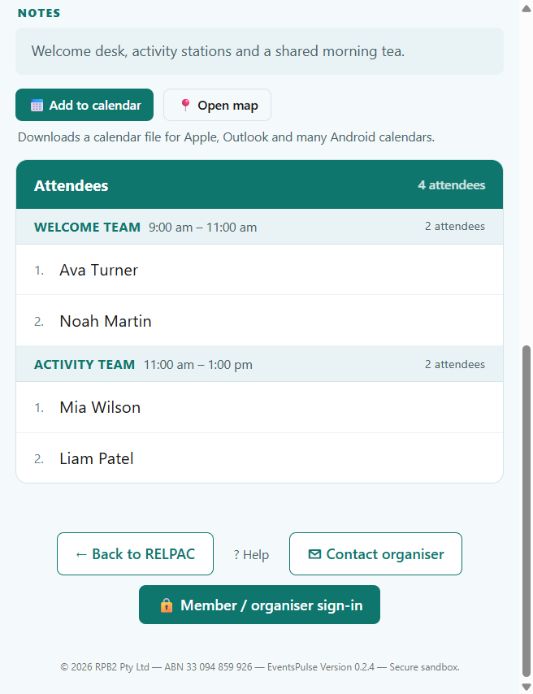
Add attendees and assign them to shifts.
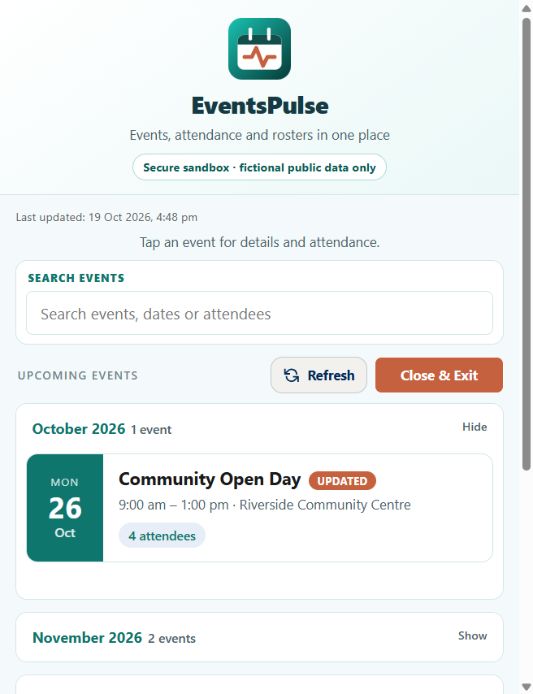
Members can view and search upcoming events, add them to their calendar and open the location in a map.
Members have read-only access; authorised organisers can change events and rosters.
Personalise EventsPulse with your organisation’s name and logo.
Keep your workspace focused on events and volunteers, without adverts.
Accounts use a password and an authenticator app.
EventsPulse works in a browser and can be installed on supported devices without an app store.
Volunteer shifts
Choose attendance with shifts, then assign people and keep the roster with the event details.
Why EventsPulse
Keep event details, rosters and attendance in one place, so organisers spend less time chasing replies and answering repeated questions.
Assign people to named shifts so everyone can see who is working where and when, helping avoid gaps and double-booking.
Everyone with access can see current event details and rosters instead of relying on old spreadsheets or forwarded emails.
One A$25.00 payment, including GST, covers one organisation workspace. There are no ongoing subscription fees or automatic renewals.
Use the full-access 15-day trial on an event of your own. No payment card is required.
Members can view events and rosters; only authorised organisers can edit them. Password and authenticator app sign-in help protect access.
Use EventsPulse in a browser on phones, tablets or computers, and install it from a supported browser without an app store.
Add your organisation name and logo to an advert-free workspace, with calendar and map links that help staff and volunteers find what they need.
How it works
One payment for your organisation
One organisation workspace, with continuing access for as long as EventsPulse is offered. Not a subscription.
Review the Purchase terms and Refund policy.
Frequently asked questions
No. Your organisation pays A$25.00 once, including GST, after the trial if it chooses to continue.
No. One purchase provides continuing access to your organisation’s workspace. Member accounts are provided by the organisation.
Create an event, choose attendance with shifts, then add shifts and assign people. Authorised organisers can update the roster; members can view it.
No. Members can view events and rosters; authorised organisers make changes.
Sign-in requires a password and an authenticator app. Organisers can manage only the workspace authorised for their account. Read the Privacy policy.
No. EventsPulse runs in the browser and can be installed from supported browsers on compatible devices.
Nothing is charged automatically. Your organisation decides whether to purchase.
Try EventsPulse free for 15 days with your next event.
Start your free trial